
MedAssist-ng
Never run out of your medications again.
A medication tracking and planning app with stock monitoring, intake schedules, and reminder notifications.







### 🤖 AI-Generated Code
> This app was 100% coded with Claude Opus 4.5. Use at your own risk.
### ⚠️ Disclaimer
> **Your health is your responsibility.** This app may contain bugs. Follow your doctor's instructions closely, keep track of your medication supply, and plan ahead for reordering.
>
> **Think of this app as a helpful tool, but make all health decisions independently!**
- [Features](#features)
- [Screenshots](#screenshots)
- [Getting Started](#getting-started)
- [Configuration](#configuration)
- [Development](#development)
# Features

Screenshots
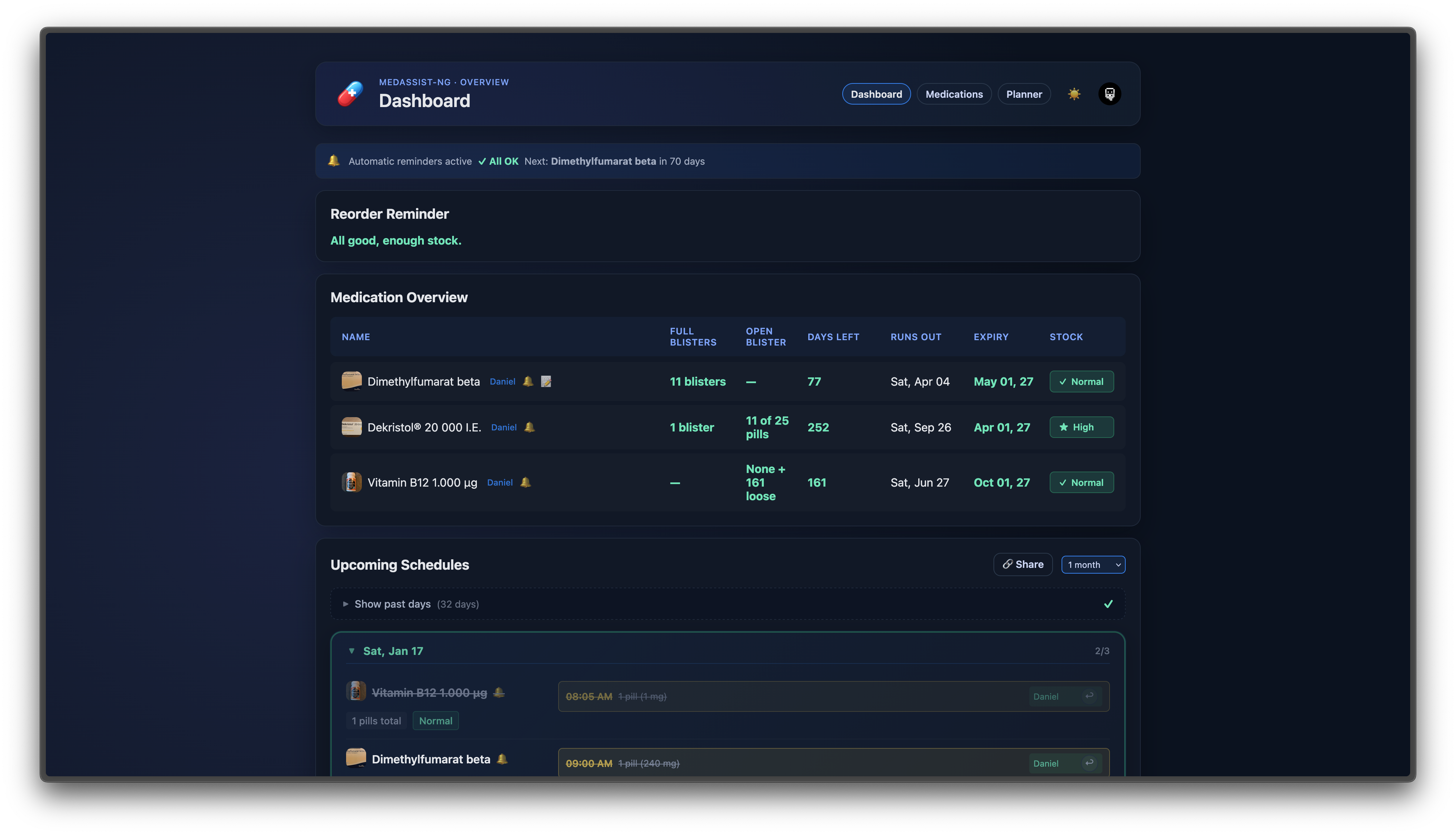
Dashboard
Overview with stock status, reorder reminders, and upcoming schedules.
Medication Detail
View medication details, stock information, and intake schedule.

Medications & Edit Form
Manage your medications with the edit form and refill feature.

Demand Calculator (Planner)
Calculate how many pills you need for a specific date range.

Shared Schedule
Share your medication schedule with others via a public link.

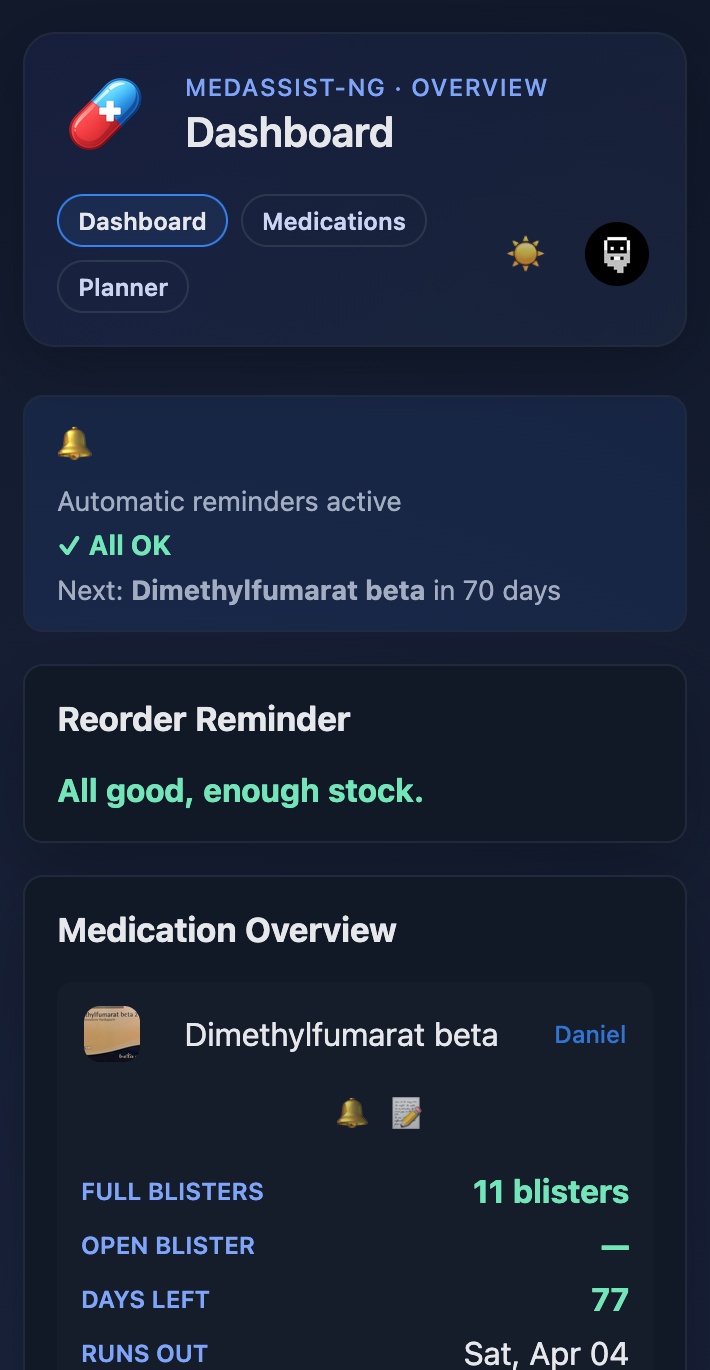
Mobile Views
Dashboard
|
Medications

|
Schedule

|
### Smart Inventory
- Track exact stock: packs, blisters, bottles, and loose pills
- Display remaining days of supply
- Automatic calculation based on intake schedule
### Medication Refill
- One-click refill with pack or loose pill options
- Complete refill history per medication
- Automatic stock updates after each refill
### Flexible Schedules
- Daily, weekly, or custom intervals per medication
- Independent schedules for each medication
### Stock Alerts & Reminders
- Notifications before stock runs out
- Configurable warning thresholds
- Intake reminders via push notifications
### Trip Planner
- Calculate how many pills you need for a trip or date range
- Plan ahead for vacations, business trips, or hospital stays
- Send demand reports via email or push notification
### Multi-Person Support
- Manage medications for multiple people
- Share schedules via link. Recipients can mark doses as taken, you see it live
### Data Export & Import
- Export all your data (medications, dose history, settings) as JSON
- Import previously exported data with automatic ID remapping
- Choose whether to include sensitive data in exports
### Notifications
- Email via SMTP
- Push notifications via ntfy, Pushover, Gotify, Telegram, Discord & more ([Shoutrrr](https://containrrr.dev/shoutrrr/))
- Supports both stock warnings and intake reminders
### Privacy & Security
- Fully self-hosted
- SSO via OIDC (Authelia, Authentik, Pocket ID, Keycloak)
- Non-root containers
- Dark mode included 😎
# Getting Started
The easiest way to deploy MedAssist-ng is with Docker Compose:
```bash
git clone https://github.com/DanielVolz/medassist-ng.git
cd medassist-ng
cp .env.example .env
docker compose up -d
```
Open `http://localhost:4174` and start tracking your medications.
# Configuration
All configuration is done via environment variables in `.env`. Copy `.env.example` to get started.
### General
| Variable | Default | Description |
|----------|---------|-------------|
| `PUID` | `1000` | User ID for container file permissions |
| `PGID` | `1000` | Group ID for container file permissions |
| `PORT` | `3000` | Backend API port |
| `CORS_ORIGINS` | `http://localhost:4174` | Allowed origins for CORS |
| `LOG_LEVEL` | `info` | Log verbosity (`debug`, `info`, `warn`, `error`) |
| `TZ` | `Europe/Berlin` | Timezone for scheduled reminders |
### Authentication
| Variable | Default | Description |
|----------|---------|-------------|
| `AUTH_ENABLED` | `false` | Enable user authentication |
| `REGISTRATION_ENABLED` | `false` | Allow new user registrations |
| `JWT_SECRET` | — | Access token signing key (required if auth enabled) |
| `REFRESH_SECRET` | — | Refresh token signing key (required if auth enabled) |
| `COOKIE_SECRET` | — | Cookie signing key (required if auth enabled) |
| `ACCESS_TOKEN_TTL_MINUTES` | `15` | Access token lifetime |
| `REFRESH_TOKEN_TTL_DAYS` | `7` | Refresh token lifetime |
Generate secrets with: `openssl rand -hex 32`
### OIDC / SSO
| Variable | Default | Description |
|----------|---------|-------------|
| `OIDC_ENABLED` | `false` | Enable OIDC authentication |
| `OIDC_ISSUER_URL` | — | OIDC provider URL |
| `OIDC_CLIENT_ID` | — | Client ID from OIDC provider |
| `OIDC_CLIENT_SECRET` | — | Client secret from OIDC provider |
| `OIDC_REDIRECT_URI` | — | Full callback URL (e.g., `https://your-domain.com/api/auth/oidc/callback`) |
| `OIDC_SCOPES` | `openid profile email` | Scopes to request |
| `OIDC_USERNAME_CLAIM` | `preferred_username` | Claim for username |
| `OIDC_AUTO_CREATE_USERS` | `true` | Auto-create users on first SSO login |
| `OIDC_PROVIDER_NAME` | `SSO` | Name shown on login button |
### Email (SMTP)
| Variable | Default | Description |
|----------|---------|-------------|
| `SMTP_HOST` | — | SMTP server hostname |
| `SMTP_PORT` | `587` | SMTP server port |
| `SMTP_USER` | — | SMTP username |
| `SMTP_PASS` | — | SMTP password |
| `SMTP_TOKEN` | — | OAuth2/App token (takes precedence over password) |
| `SMTP_FROM` | — | Sender email address |
| `SMTP_SECURE` | `false` | Use TLS |
### Reminders
| Variable | Default | Description |
|----------|---------|-------------|
| `REMINDER_DAYS_BEFORE` | `7` | Days before stock runs out to send reminder |
| `REMINDER_HOUR` | `6` | Hour to send daily reminders (24h format) |
| `REMINDER_MINUTES_BEFORE` | `15` | Minutes before intake to send reminder |
| `EXPIRY_WARNING_DAYS` | `30` | Days before expiry to show warning |
### Push Notifications (Shoutrrr)
MedAssist uses [Shoutrrr](https://containrrr.dev/shoutrrr/) for push notifications, supporting many services with a single URL format.
**Supported services:** ntfy, Pushover, Gotify, Discord, Telegram, Slack, Matrix, and [many more](https://containrrr.dev/shoutrrr/v0.8/services/overview/).
Configure push notifications in Settings → Push, or set defaults via environment variables:
| Variable | Default | Description |
|----------|---------|-------------|
| `DEFAULT_SHOUTRRR_ENABLED` | `false` | Enable push notifications by default |
| `DEFAULT_SHOUTRRR_URL` | — | Shoutrrr URL (see examples below) |
| `DEFAULT_SHOUTRRR_STOCK_REMINDERS` | `true` | Send stock warnings via push |
| `DEFAULT_SHOUTRRR_INTAKE_REMINDERS` | `true` | Send intake reminders via push |
### Default User Settings
These defaults are applied when a new user is created. Once a user saves settings in the app, their values take precedence.
| Variable | Default | Description |
|----------|---------|-------------|
| `DEFAULT_SHARE_STOCK_STATUS` | `true` | Show stock status (Normal/Low/Critical) on shared schedule links |
#### URL Examples
**ntfy** (free, self-hostable):
```
ntfy://ntfy.sh/your-topic
ntfy://user:password@your-server.com/topic
```
**Pushover** (free app for iOS/Android):
```
pushover://shoutrrr:API_TOKEN@USER_KEY/
```
Get your keys at [pushover.net](https://pushover.net/):
- **User Key**: Shown on your dashboard (top right)
- **API Token**: Create an application → copy the API Token
**Gotify** (self-hosted):
```
gotify://your-server.com/TOKEN
```
**Discord**:
```
discord://TOKEN@WEBHOOK_ID
```
**Telegram**:
```
telegram://TOKEN@telegram?chats=CHAT_ID
```
For all services and options, see the [Shoutrrr documentation](https://containrrr.dev/shoutrrr/v0.8/services/overview/).
# Development
```bash
docker compose -f docker-compose.dev.yml up
```
- Frontend: `http://localhost:5173` (hot reload)
- Backend: `http://localhost:3000`
# Acknowledgements
This project was inspired by [MedAssist](https://github.com/njic/medassist) by njic.